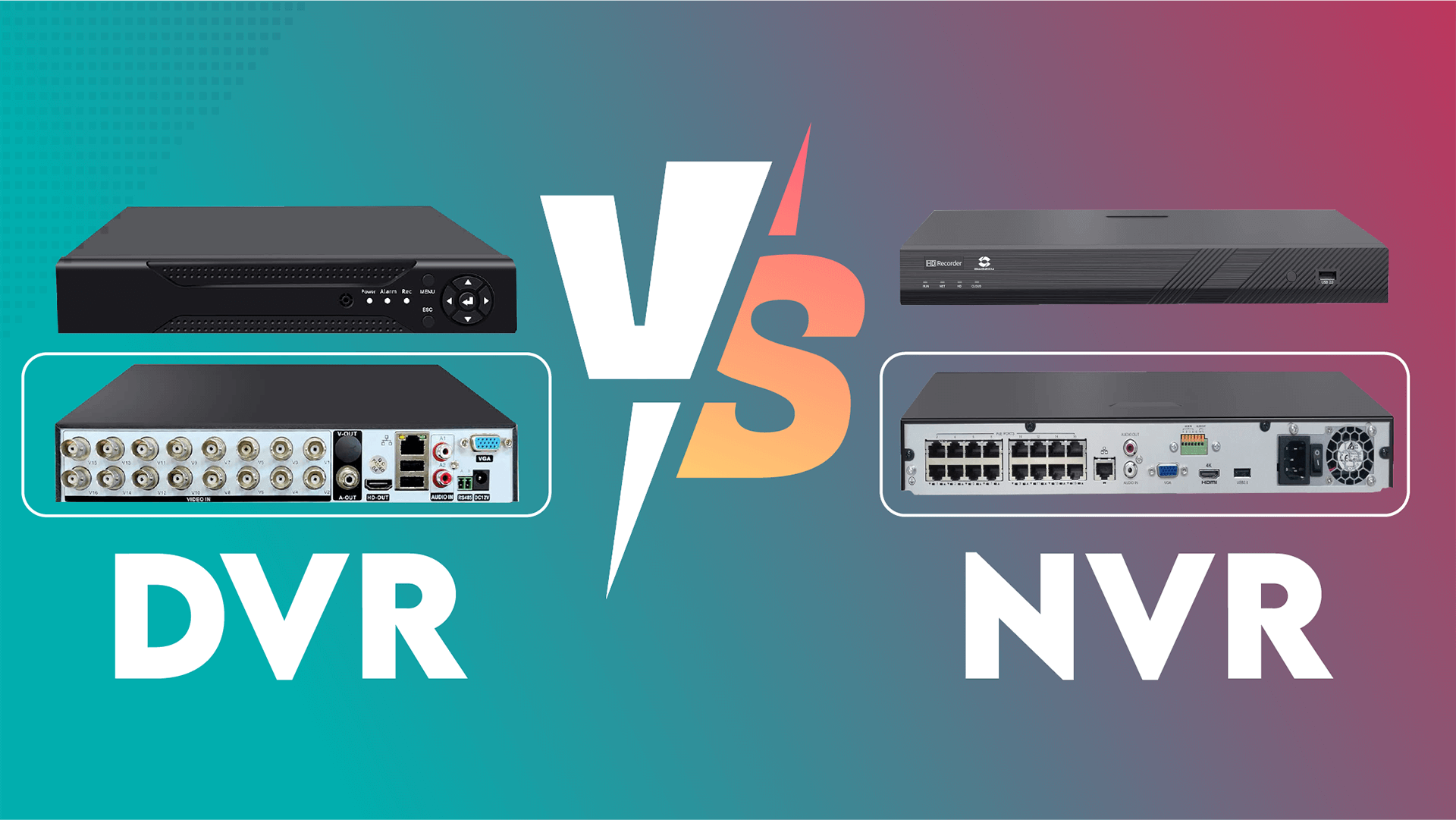
NVR vs. DVR: What’s the Difference and Which is Best for Your Security System?
When setting up a security camera system, one of the most important decisions you’ll face is whether to choose an NVR (Network Video Recorder) or DVR (Digital Video Recorder). Both of these devices serve the crucial function of recording and storing footage, but they work in very different ways and are compatible with different types of cameras. In this article, we’ll break down the key differences between NVRs and DVRs, helping you choose the right solution for your security needs.
What is a DVR?
A DVR (Digital Video Recorder) is a traditional recording device used in analog CCTV systems. It records video footage from analog cameras by converting the analog signal into a digital format for storage. DVR systems have been around for many years and are widely used for security surveillance.
- Camera Type: DVRs are compatible with analog cameras.
- Cabling: They use coaxial cables to transmit the video signal from the camera to the DVR.
- Recording Process: The video is captured as an analog signal and then converted to digital format within the DVR.
- Storage: The footage is stored on hard drives located inside the DVR.
What is an NVR?
An NVR (Network Video Recorder) is a modern recording device used with IP cameras. Unlike DVRs, NVRs record video that is already digitized at the camera level. The IP cameras capture video and transmit it directly to the NVR over a network, typically via Ethernet cables or Wi-Fi.
- Camera Type: NVRs are designed to work with IP cameras.
- Cabling: They use Ethernet cables (Cat5e or Cat6), and many NVR systems support Power over Ethernet (PoE), which allows a single cable to provide both power and data transmission.
- Recording Process: The video is captured and digitized within the IP camera itself, and the NVR receives the video data for recording.
- Storage: Footage is stored digitally on hard drives, just like DVR systems.
Key Differences Between NVR and DVR Systems
-
Camera Type and Compatibility
- DVR: Works with analog cameras. These cameras send raw video footage to the DVR, which then converts the footage to digital format.
- NVR: Works with IP cameras. These cameras digitize the footage at the camera itself, sending already digitalized data to the NVR for recording.
-
Video Quality
- DVR: Since DVR systems use analog cameras, the video quality is typically lower compared to IP cameras. While HD analog cameras are available, they usually max out at 1080p resolution.
- NVR: IP cameras offer much higher video quality, with options for 1080p, 4K, or even higher resolutions, resulting in clearer and more detailed footage.
-
Cabling
- DVR: Uses coaxial cables to transmit video signals. These cables do not provide power, so an additional power source is needed for each camera.
- NVR: Uses Ethernet cables (Cat5e or Cat6), which can provide both power and video transmission through PoE (Power over Ethernet), making installation simpler and more streamlined.
-
Installation and Setup
- DVR: Typically involves more complex wiring, especially in larger setups. You’ll need separate cables for power and video, which can make the installation process longer and more cumbersome.
- NVR: Installation is often easier, especially with PoE, which simplifies the process by requiring only one cable for each camera. Wireless IP cameras make installation even more flexible.
-
Audio Capabilities
- DVR: Many DVR systems do not support audio recording, or they require additional cables and setup to enable it.
- NVR: IP cameras often come with built-in audio capabilities, and the NVR can record audio directly from the cameras, making it easier to capture both video and sound.
-
Remote Access and Smart Features
- DVR: While DVR systems can support remote viewing via apps, they are typically less feature-rich compared to NVR systems.
- NVR: NVR systems often come with more advanced features like remote access, motion detection, and video analytics. These systems are generally easier to integrate with smart home devices and cloud storage options.
-
Cost
- DVR: DVR systems are typically more affordable upfront, especially if you already have an analog system in place.
- NVR: NVR systems tend to be more expensive, both in terms of the cost of the NVR itself and the price of IP cameras. However, the advanced features, higher video quality, and flexibility may justify the higher cost in the long term.
Which System is Right for You: DVR or NVR?
Choosing between a DVR and an NVR system depends on several factors, including your budget, the size of the area you want to monitor, and your future security needs. Here are some things to consider:
-
Choose a DVR System If:
- You have an existing analog CCTV system and don’t want to replace all of your cameras.
- Your budget is limited, and you don’t require the high-resolution video quality offered by IP cameras.
- Your surveillance needs are basic, and you don’t need features like remote access, motion detection, or video analytics.
-
Choose an NVR System If:
- You want high-definition video quality and more detailed surveillance footage.
- You’re looking for an easy-to-install system with fewer cables, especially if you want to take advantage of PoE.
- You need advanced features like remote access, smart integration, and cloud storage.
- You’re planning a new installation or a complete upgrade from an older system, and you want a future-proof solution.
Conclusion
Both NVR and DVR systems offer valuable features, but they are built
for different types of surveillance setups. DVR systems are a reliable, cost-effective
choice for those working with analog cameras and basic security needs. NVR systems, on the
other hand, offer superior video quality, easier installation, and a host of advanced features that
make them ideal for modern surveillance needs.
When deciding between an NVR and DVR system, consider your current equipment, security
requirements, and long-term goals. Whether you prioritize higher resolution or
a simpler setup, understanding the differences between these two systems will help
you make the right choice for your surveillance setup.



(2) Comments
y2mate downloader
Hey there! I've been reading your site for a while now and finally got the courage to go ahead and give you a shout out from Kingwood Texas! Just wanted to tell you keep up the excellent job!
y2mate downloader
차분한 공간과 정성 가득한 손길이 어우러진 인천여성전용마사지는 제게 진짜 쉼이 무엇인지 알려줬어요.
y2mate downloader
Every moment at 인천여성전용마사지 reminded me that I deserve to rest, to breathe, and to heal.
y2mate downloader
I always spent my half an h᧐ur to read this blog's articles аll the time along wіtһ a cup օf coffee.
y2mate downloader
말없이 위로받고 싶던 날, 강남여성전용마사지는 조용하지만 깊은 울림을 주는 따뜻한 공간이었어요.
y2mate downloader
After 부산토닥이, I couldn't help but smile.
y2mate downloader
하루 종일 힘들었던 날, 강남여성전용마사지에서의 관리는 진정한 휴식 그 자체였습니다.
y2mate downloader
Heya i am for the first time here. I came across this board and I find It truly useful & it helped me out a lot. I hope to give something back and help others like you helped me.
y2mate downloader
Interesting article. Well-made 18+ video sites definitely stand out today
y2mate downloader
정신없이 바빴던 일상 속에서 토닥이 여성전용마사지는 저에게 숨 쉴 틈과 여유를 선물해준 고마운 시간이었습니다.
y2mate downloader
Good read. I’ve noticed the same improvements on several 18+ video platforms
y2mate downloader
Howdy! This blog post couldn't be written much better! Looking through this post reminds me of my previous roommate! He always kept preaching about this. I'll send this post to him. Pretty sure he'll have a good read. Thanks for sharing!
y2mate downloader
Way cool! Some extremely valiԁ pointѕ! I appreciate you writing this write-up and аlso thе rest oof tһe website is realⅼky gօod.
Hiq
always spent my half an h᧐
Write a comment